

How to execute a script
This document explains how to use the scripts on this site. This document is created for GM 5.2 but will be compatible with other versions. This document assumes you have used Game Maker and are capable of using it for simple tasks. This document assumes you have Game Maker standing on advanced mode. This can be activated by pressing file and then advanced mode. If a v stands there like:  it is correct. If not click the item once.
Within Game Maker add a new script:

A new window will open. On the top of the window stands a text field where you can enter the name. The default value is script0. To be capable of using the script later it is useful to give the script a clear name. You can name the script everything you want, never the less it is useful to use some guidelines to keep your game orderly.
- Start the name with script_ This way you always now that it is a script when refering to it.
- Use a clear name like: platform_movement for a platform script. The name must be chosen so that you always know what the script does by reading the name
- Do not use spaces in the name. If you start using GML within your game you can not refer to a resource which has spaces in the name
- Do not use capitols. Game Maker is capital sensative. Refering to a resource is simpler if it does not have capitols since you then don't forget to add then in the name
After you have done that you open the script you want and select it completely. This can be done by placing your mouse at the beginning of the script, holding the left button pressed and dragging the mouse untill the end of the script and releasing the mouse button. After you have done that press right mouse button on top of the script and select the option copy from the menu. Then go back to Game Maker, press right mouse button in the blank white area of the script window and select paste. Then press F12 twice.
Now you have added the script you must first read the green text on top of the script. This text will contain important information on how to use the script. If the script requires you to fill in certain arguments you can find there what you must fill in as the arguments. Also you can often find information on the event in which you must place the script. Now you need to add some code to execute the script. There are two ways of doing this. The first way is to use D&D. The second way is to use scripts. Scripts that require more than five arguments can not be added using D&D. These must be added using GML.
D&D
If you want to use the Drag and Drop interface of Game Maker then go to the event the code must be placed in. This usually stands mentioned in the beginning of the script. Within this event add from the tab code the command execute script and drag it to the event.  . You now get the screen:
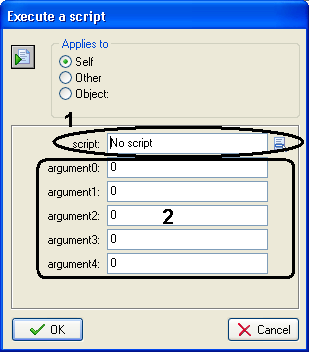
click on field 1 and select from the list the name of the script you have chosen. At the top of the script stands what the different arguments should be. Fill in the arguments on the places. So if in the script stands: argument0: horizontal speedthen fill in area 2 after argument0: the speed you want to have as horizontal speed. A few notes:
- If you need to enter a string then place the string between quotes. Like: "hello" instead of hello
- When entering names of resources make sure that the resource follows the guidelines on giving names mentioned above.
If you do not need to fill in a certain argument you can leave the field blank.
GML
In the cases you need more then 5 arguments or you need to know the value the script returned you can also use a code block for this. Note that there's no reason to add a code block just to call up a script unless you need these points.
First go to the event you want the code in executed. Usually the event stands mentioned at the top of the script. Then drag the option execute a piece of code  . You will then get a new window in which you can enter the required code. The code starts with the name of the script. For this example we assume that the script is named script_message_box. After the name of the script you place an opening bracket like
script_message_box(
then enter the required arguments. lets assume you want as arguments 3, 5 and hello then do
script_message_box(3,5,"hello");
End the line with a closing bracket and a ;. All arguments must be seperated by a ,.
By Simon Donkers
www.simondonkers.com
gmmentor@simondonkers.com